
API Testing,
Supercharged.
Napper is a free, open-source API testing tool for anyone testing APIs. It runs from the command line and edits natively in VS Code, Zed, and any editor via a portable language server.
Define HTTP requests as plain text .nap files, add declarative assertions, chain them into test suites, and run everything in CI/CD with JUnit output.
Migrate from .http files with a single command. As simple as curl for quick requests. As powerful as your own code — script in JavaScript, Python, F#, or C#.
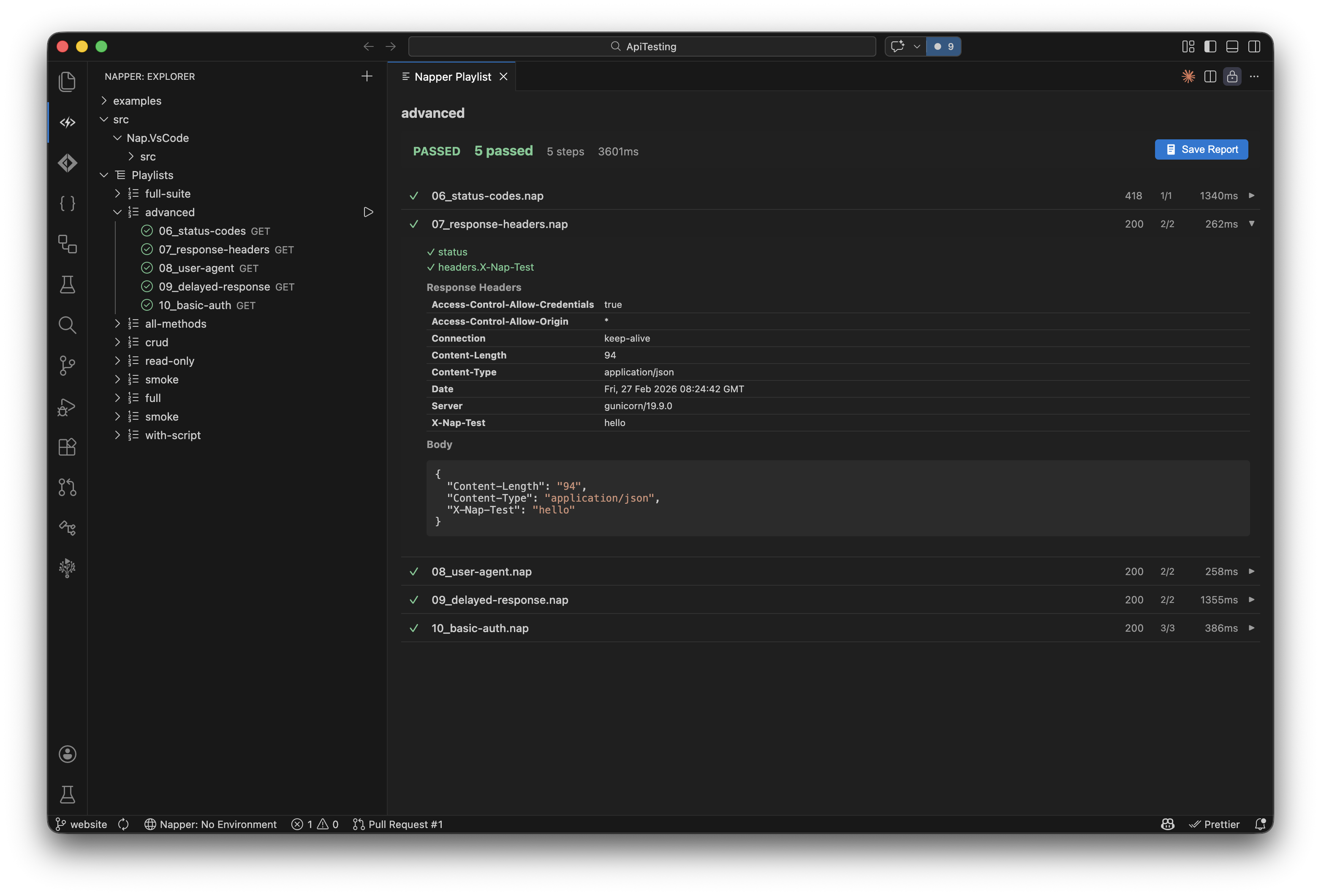
Run playlists, inspect responses, and verify assertions — all inside VS Code.
What can Napper do?
Everything you need for API testing. Nothing you don't.
CLI First
The command line is the product. Run requests, execute test suites, and integrate with CI/CD pipelines from your terminal.
Editor-Native, LSP-Powered
First-class extensions for VS Code and Zed — and every VS Code-compatible editor (Cursor, Windsurf, Antigravity, VSCodium) via Open VSX — plus a portable language server that brings completions, diagnostics, and hover to any editor. Syntax highlighting, request explorer, environment switching, and Test Explorer integration. Never leave your editor.
Script in Any Language
Add playlist steps and pre/post hooks in JavaScript, Python, F#, or C# — whatever your team already runs, mixed freely in one playlist. Extract tokens, build dynamic payloads, and validate responses with real runtimes and full ecosystem access. No sandbox. In JavaScript and Python, an injected ctx object gives you the response and passes variables between steps.
Declarative Assertions
Assert on status codes, JSON paths, headers, and response times with a clean, readable syntax. No scripting required for simple checks.
Composable Playlists
Chain requests into test suites with .naplist files. Nest playlists, reference folders, pass variables between steps.
Plain Text, Git Friendly
Every request is a .nap file. Every environment is a .napenv file. Version control everything. No binary blobs, no lock-in.
OpenAPI Import
Generate .nap test files from any OpenAPI spec. Import from a URL or a local file. Optionally enhance with AI via GitHub Copilot for smarter assertions and realistic test data.
.http File Conversion
Migrate from .http files with one command. Napper converts both Microsoft (REST Client) and JetBrains formats to .nap files, including variables and environments.
How does Napper compare to other API testing tools?
See how Napper stacks up against Postman, Bruno, and .http files.
| Feature | Napper | Postman | Bruno | .http files |
|---|---|---|---|---|
| CLI-first design | Yes | No | GUI-first | No CLI |
| Editor integration | VS Code, Cursor, Windsurf, Antigravity, Zed & LSP | Separate app | Separate app | VS Code only |
| Git-friendly files | Yes | JSON blobs | Yes | Yes |
| Assertions | Declarative + scripts | JS scripts | JS scripts | None |
| Full scripting language | JS, Python, F#, C# | Sandboxed JS | Sandboxed JS | None |
| CI/CD output formats | JUnit, JSON, NDJSON | Via Newman | Via CLI | None |
| Test Explorer | Native | No | No | No |
| Free & open source | Yes | Freemium | Yes | Yes |
| OpenAPI import | URL + file + AI | Import only | Import only | No |
| .http file migration | Built-in converter | Import only | No | N/A |
| No account required | Yes | Account needed | Yes | Yes |
How do you use Napper?
From one-liners to full test suites.
Minimal request
POST with body
Run from CLI
Frequently Asked Questions
What is Napper?
Napper is a free, open-source, CLI-first API testing tool for anyone testing APIs. It integrates natively with VS Code and Zed, and works in any editor through a portable language server. It lets you define HTTP requests as plain text .nap files, add declarative assertions to validate responses, compose requests into test suites with .naplist files, and run everything from the terminal or your editor. Script advanced flows in JavaScript, Python, F#, or C#, and output JUnit XML for CI/CD pipelines.
Is Napper free?
Yes. Napper is completely free and open source under the MIT license. There are no paid tiers, no account requirements, and no feature gates. The CLI binary and the VS Code extension are both free to use.
How is Napper different from Postman?
Postman is a GUI-first tool that requires an account, stores collections as JSON, and locks advanced features behind a paywall. Napper is CLI-first, stores everything as plain text files in your repository, requires no account, and is completely free. Napper also gives you real scripting in JavaScript, Python, F#, or C# — run by real runtimes, not a sandbox — and integrates directly into VS Code, Zed, and any editor via a portable language server with native Test Explorer support.
How is Napper different from Bruno?
Bruno is an excellent open-source alternative to Postman, but it is GUI-first with a standalone desktop application. Napper puts the CLI first and lives inside your editor — VS Code, Zed, or any editor via its language server. For scripting, Bruno offers sandboxed JavaScript while Napper lets you script in JavaScript, Python, F#, or C# with your real runtime and full ecosystem access — no sandbox. Both store requests as plain text files.
Does Napper work with CI/CD pipelines?
Yes. Napper is designed for CI/CD from the ground up. The CLI binary is self-contained with no runtime dependencies. It outputs JUnit XML, JSON, and NDJSON formats (cli-output). It integrates with GitHub Actions, GitLab CI, Jenkins, Azure DevOps, and any platform that supports standard test output formats. Exit code 0 means all assertions passed, exit code 1 means a test failed (cli-exit-codes).
What scripting languages does Napper support?
Napper scripts in JavaScript (.js), Python (.py), F# (.fsx), and C# (.csx) as playlist steps and pre/post request hooks, and you can mix languages in a single playlist. In JavaScript and Python an injected ctx object exposes the response and lets a script pass variables to later steps. Unlike the sandboxed JavaScript in Postman and Bruno, Napper scripts run on real runtimes — Node.js, Python 3, or .NET — with full ecosystem access (npm, PyPI, NuGet). Parse XML, call databases, generate cryptographic tokens, validate complex schemas, use any package.
What file formats does Napper use?
Napper uses three plain text file formats: .nap files for individual HTTP requests, .naplist files for composing requests into ordered test suites, and .napenv files for environment-specific variables like base URLs and tokens. All files are human-readable, git-friendly, and produce clean diffs in code reviews.
Can I convert my existing .http files to Napper?
Yes. Napper includes a built-in converter that transforms .http files into .nap files. Run napper convert http ./requests.http and Napper will parse your requests, map variables to .napenv files, and preserve request names. The converter supports both Microsoft (VS Code REST Client) and JetBrains (IntelliJ, Rider, WebStorm) .http dialects, including environment files like http-client.env.json.
Does Napper require VS Code?
No. The Napper CLI runs independently from any editor or IDE. You can use it entirely from the terminal. The editor extension is optional — it works in VS Code, in VS Code-compatible editors like Cursor, Windsurf, and Antigravity (via Open VSX), and in Zed, providing syntax highlighting, a request explorer, environment switching, and Test Explorer integration. Any other editor can connect to the bundled language server.